


What Is T1V ThinkHub?
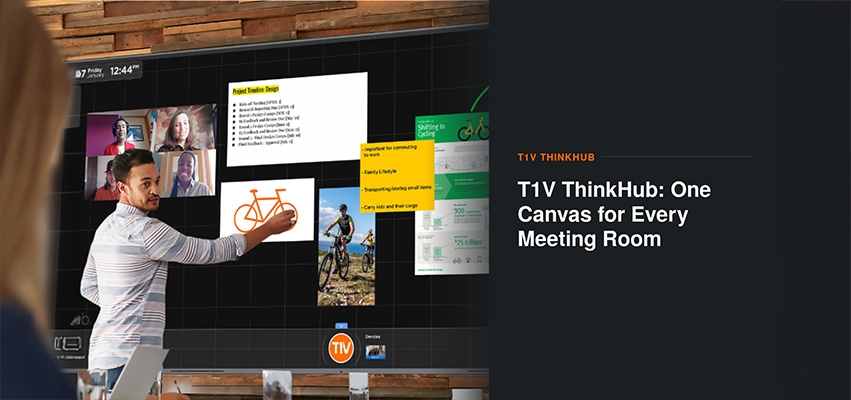
ThinkHub is an interactive Canvas platform built for meeting rooms that need to compare content, not just present it. Most meeting room technology is built around one presenter and one screen, which works for a slide deck but breaks down as soon as a team needs to compare a document against a dashboard, or check a live data feed while a remote colleague is on video. ThinkHub gives that team a single Canvas where every piece of content sits side by side.
How Does ThinkHub Handle Documents, Dashboards, and Video Calls at the Same Time?
On a ThinkHub Canvas, content is placed the way notes are placed on a physical board: a document card here, a chart there, a video call tile in the corner. Anyone in the room, or joining remotely, sees the full picture at once rather than one window at a time. Content on the Canvas can include:
- Documents and PDFs
- Dashboards and live data feeds
- Video call tiles from the room’s existing conferencing platform
- Images and reference photos
- Freehand sketches and annotations, added directly with a finger or stylus
Does ThinkHub Replace Microsoft Teams, Zoom, Webex, or Google Meet?
No. ThinkHub works alongside a room’s existing video conferencing platform rather than replacing it. Remote participants join the same call the room already runs, through Teams, Zoom, Webex, or Google Meet, placed on the Canvas next to everything else being discussed.
Can ThinkHub Scale From a Single Display to a Full Video Wall?
Yes. A small huddle room and a large design studio do not need the same amount of screen space, but they can run the same software. ThinkHub scales from one interactive display up to a full video wall made of several panels working as one Canvas, so a room can start with a single screen and expand later without changing how the team works.
At a Glance
| Category | Capability |
| Core function | One interactive Canvas holding documents, dashboards, video calls, and live data together |
| Conferencing compatibility | Works alongside Microsoft Teams, Zoom, Webex, and Google Meet |
| Scaling path | Single display up to a full multi-panel video wall, same Canvas software throughout |
| Input | Touch and stylus annotation directly on the Canvas |
| Room integration | Displays, touch hardware, audio, and control, integrated by GAV MGMT |
Who Integrates ThinkHub Into a Meeting Room?
A Canvas display is one part of a room’s overall technology design. GAV MGMT integrates T1V ThinkHub into the full room, including displays, touch hardware, audio, and control, as part of a broader portfolio that also includes Crestron control systems, Samsung and Neat displays, and Shure and 1 Sound audio, matched to each room’s specific use case.
Frequently Asked Questions
What is T1V ThinkHub?
ThinkHub is an interactive Canvas platform that lets a meeting room bring documents, dashboards, video calls, and live data onto one shared display at the same time, instead of switching between separate screens or applications.
Does ThinkHub replace my video conferencing platform?
No. ThinkHub works alongside a room’s existing platform, including Teams, Zoom, Webex, and Google Meet, so the room keeps meeting the way it already does.
Can ThinkHub scale from one display to a video wall?
Yes. The same Canvas experience runs on one screen or across multiple panels combined into a video wall, so a room can start small and expand later.
Does ThinkHub support touch input?
Yes. ThinkHub is built for touch and stylus interaction, including freehand annotation directly on the Canvas, alongside standard keyboard and mouse input.
What room types benefit most from ThinkHub?
Design review rooms, executive briefing rooms, data and operations rooms, and training rooms all benefit from comparing multiple content types on one surface.
Rethinking Your Room
A room built around one interactive Canvas supports more of how a team actually works: comparing, annotating, and presenting several types of content without switching screens. Outfitting a lobby, retail space, or wayfinding system instead? See our post on Samsung VXT for digital signage content management. Rethinking how your space should support collaboration? Talk to GAV MGMT.
Written by Gianfranco, Digital Marketing Manager at GAV MGMT