


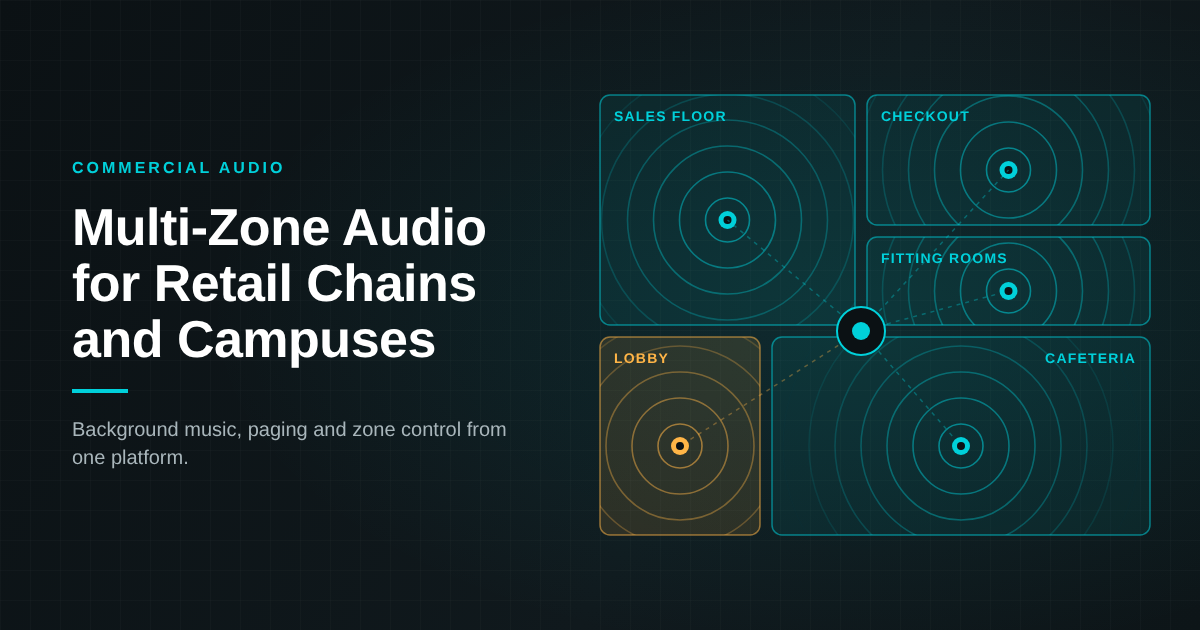
A multi-zone audio system is a commercial audio system that divides a building into independently controlled areas, called zones, so each area can play its own source, volume and paging announcements from one centrally managed platform.
For national retail chains and large corporate environments, that means one standard design that scales from a single store or floor to hundreds of sites.
This guide explains how multi-zone audio systems work, how retail and campus teams use them, and what to plan for before a rollout.
How multi-zone audio systems work
A multi-zone audio system routes multiple audio sources to multiple zones, with each zone controlled on its own. Most modern designs run as distributed audio over the building network, which lets one platform manage every zone from a single interface.
Every system is built from four parts:
- Sources: background music streams, local media players, microphones, and paging inputs.
- Zones: defined areas such as a sales floor, fitting rooms, a cafeteria, a lobby, or a floor of offices.
- Processing and amplification: DSP and amplifiers that set levels, EQ, and priorities for each zone.
- Control: wall keypads, touch panels, scheduling, and remote management for IT and facilities teams.
Paging sits on top of the music layer. An announcement can target one zone, a group of zones, or the whole building, then hand audio back to the music source when it ends.
Multi-zone audio for national retail chains
For national retail chains, multi-zone audio delivers the same brand sound in every location while letting each store tune audio to its own layout. A standard retail sound system design becomes a repeatable template that installs, operates and supports the same way at every site.
Common retail zones include:
- Sales floor: brand-approved background music at a level that supports browsing.
- Fitting rooms and service areas: lower volume or separate content for a more private experience.
- Checkout: clear paging for line calls and staff requests.
- Back of house and receiving: staff paging and alerts kept separate from the customer zones.
- Entrances and storefronts: promotional audio scheduled by time of day or campaign.
Central management lets head office update playlists, schedules and announcement libraries across the whole chain, while store managers keep simple local control of volume through a keypad or panel.
Multi-zone audio for large corporate campuses
On a corporate campus, multi-zone audio gives each shared space the right sound for how it is used, while facilities and IT manage every building from one platform. Distributed audio over the network lets the system grow floor by floor or building by building.
Common campus zones include:
- Lobbies and reception: welcoming background music and visitor announcements.
- Cafeterias and lounges: music scheduled around meal times and events.
- Open office floors: low-level background audio and floor-specific paging.
- Town hall and multipurpose spaces: audio that can be combined or split as rooms are reconfigured.
- Building-wide paging: announcements to one floor, one building, or the full campus.
Because the system runs on the network, IT teams can monitor devices, apply updates and adjust zones remotely, which keeps operations consistent across sites.
What to plan before a multi-zone audio rollout
A successful multi-zone audio rollout starts with a standard design that matches each space to its use case. These are the criteria enterprise AV and facilities teams should define first.
| Planning area | What to define | Retail chains | Corporate campuses |
| Zone map | Which spaces need independent control | Sales floor, checkout, fitting rooms, back of house | Lobbies, cafeterias, office floors, event spaces |
| Sources | Music, media, microphones and paging inputs per zone | Brand music service, promotional audio | Background music, event audio, live microphones |
| Paging priorities | Which announcements override music, and where | Store-wide, checkout, back of house | Floor, building, campus-wide |
| Control | Who adjusts what, and from where | Head office schedules, local volume control | Facilities control, room-level keypads |
| Network | How audio runs over existing IT infrastructure | Repeatable per-store network template | VLANs and QoS across buildings |
| Management | Monitoring, updates and remote support | Chain-wide visibility from one dashboard | Campus-wide visibility for IT |
| Scalability | How new sites and zones are added | New store template | New floors and buildings |
Before you standardize, confirm:
- A zone map for each site or building type
- A paging priority plan
- Network requirements agreed with IT
- Control roles for head office, site managers and facilities
- A pilot site to validate the standard design
How GAV MGMT delivers multi-zone audio at scale
GAV MGMT designs, builds and supports multi-zone audio systems for national retail chains and corporate campuses as a single design-build partner. We select platforms by use case from a multi-vendor portfolio, then standardize the design so every site performs the same way.
Our audio portfolio includes options such as:
- Crestron networked audio and control, including the DM NAX platform, for zone routing, scheduling and centralized management.
- Shure microphones and audio processing for paging and live voice.
- 1 Sound loudspeakers for coverage matched to each space.
From zone mapping and network coordination with IT through installation, commissioning and ongoing support, one team owns the rollout across every location.
You can hear a networked audio environment in person at the GAV MGMT Experience Centre at First Canadian Place in Toronto.
Frequently asked questions
What is a multi-zone audio system?
A multi-zone audio system divides a space into independently controlled zones, each with its own source, volume and paging, managed from one central platform.
What is the difference between multi-zone audio and distributed audio?
Distributed audio describes sending audio to speakers across a building. Multi-zone audio adds independent control of each area, so different zones can play different content at different levels.
How do national retail chains use multi-zone audio systems?
Retail chains use multi-zone audio to deliver consistent brand music, scheduled promotions and targeted paging across every store from one centrally managed design.
Can a multi-zone audio system run on our existing network?
Many commercial audio systems run over standard IP networks. Your integrator should confirm network requirements such as VLANs and QoS with your IT team during design.
Can paging and background music share the same system?
Yes. Paging is set as a higher priority, so an announcement plays in the selected zones and the music resumes when it ends.
Plan your multi-zone audio standard
GAV MGMT helps enterprise AV and facilities teams design one multi-zone audio standard and roll it out across every store, floor and building. Book a visit to the Experience Centre or talk to our team to start your zone plan.
Written by Gianfranco, Digital Marketing Manager at GAV MGMT