


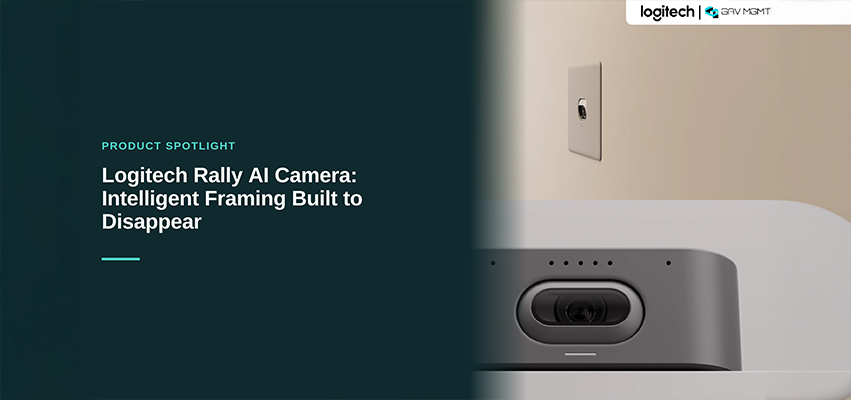
Les salles de réunion ont un problème de cadrage. Les caméras conçues pour des plans fixes peuvent laisser de côté les personnes aux extrémités de la table, couper la personne qui se lève pour présenter ou laisser les participants à distance regarder une chaise vide pendant que la conversation se déplace ailleurs dans la salle. La nouvelle Logitech Rally AI Camera, annoncée comme étant bientôt disponible, est conçue pour résoudre ce problème grâce à un cadrage propulsé par l’IA qui s’ajuste en temps réel, dans une caméra conçue pour être aussi discrète que possible.
Ce que fait la Rally AI Camera
Au cœur de la Rally AI Camera se trouve RightSight 2, la technologie de cadrage propulsée par l’IA de Logitech. Combinée à un capteur d’image de 20 mégapixels de 1 pouce et à un objectif conçu par Logitech, la caméra capture des vidéos 4K et utilise cette intelligence pour déterminer en temps réel quelles personnes doivent apparaître dans le cadre.
Elle offre quatre modes de cadrage :
- Grid View : cadre chaque participant dans une vignette distincte, à la manière d’une vue galerie de webcam, pour les réunions où les échanges sont nombreux.
- Group View : cadre toute la salle lorsqu’une vue grand-angle est nécessaire.
- Speaker View : isole l’intervenant actif, ce qui convient aux présentations ou aux discussions individuelles ciblées.
- Camera Zone : permet aux administrateurs de définir des limites à gauche, à droite et en profondeur afin que la caméra exclue les mouvements à l’extérieur de l’espace de réunion, comme les personnes qui circulent derrière une cloison vitrée.
Une conception conçue pour se faire oublier
La Rally AI Camera se distingue sur le plan de la conception grâce à la possibilité de l’installer dans un mur. Plutôt que d’être posée sur une étagère sous l’écran ou installée comme un module visible au-dessus de celui-ci, la caméra peut être encastrée à fleur de mur. Pour les intégrateurs et les équipes responsables des installations qui accordent de l’importance à l’apparence d’une salle autant qu’à son fonctionnement, il s’agit d’une évolution importante. La technologie fait son travail sans devenir un élément visuel dominant de la salle.
Où s’intègre-t-elle?
La Rally AI Camera est certifiée pour Zoom Rooms et Microsoft Teams Rooms et prend en charge les configurations à une seule caméra ainsi que les déploiements à plusieurs caméras pour les espaces plus grands ou plus complexes. Du côté audio, elle s’intègre au système Logitech Rally ou à des partenaires audio professionnels comme Shure, Biamp et Q-SYS. La caméra peut ainsi être intégrée à une salle sans imposer le reste de la conception audio.
La gestion s’effectue au moyen de Logitech Sync, la même plateforme utilisée pour les autres appareils Logitech destinés aux salles de réunion. La connexion peut se faire par Wi-Fi ou PoE pour permettre la surveillance et les mises à jour à distance, en complément de la gestion du reste du parc d’appareils.
À retenir
Le cadrage propulsé par l’IA devient une fonctionnalité standard des caméras pour salles de réunion. Ce qui distingue la Rally AI Camera, c’est l’association de cette intelligence à une conception physique qui permet à la caméra de se fondre dans l’espace plutôt que de se faire remarquer. Pour les organisations qui planifient la modernisation d’une salle, il s’agit d’une caméra qui mérite d’être considérée et dont il vaut la peine de discuter avec un intégrateur avant de finaliser la conception de la salle.
Foire aux questionsFoire aux questions
Qu’est-ce que la Logitech Rally AI Camera?
La Rally AI Camera est une caméra de salle de conférence de Logitech qui utilise la technologie RightSight 2 basée sur l’IA pour cadrer automatiquement les participants à une réunion. Elle combine un capteur d’image de 20 mégapixels de 1 pouce à un objectif conçu par Logitech pour capturer des vidéos 4K. Sa conception discrète est pensée pour se fondre dans la salle plutôt que de s’imposer comme un élément matériel visible.
Comment fonctionne le cadrage propulsé par l’IA RightSight 2?
RightSight 2 ajuste le champ de vision de la caméra en temps réel selon ce qui se passe dans la salle. Il peut afficher l’ensemble du groupe, isoler l’intervenant actif ou répartir les participants dans des vignettes individuelles semblables à une vue galerie. Camera Zone permet aux administrateurs de définir des limites à gauche, à droite et en profondeur afin que la caméra ignore les mouvements à l’extérieur de l’espace de réunion, comme les personnes qui passent derrière une cloison vitrée.
La Rally AI Camera peut-elle être installée dans un mur?
Oui. Logitech offre un support mural encastré en option pour la Rally AI Camera, permettant une installation discrète où la caméra affleure le mur plutôt que d’en dépasser ou d’être posée sur une étagère sous l’écran.
Quelles plateformes vidéo la Rally AI Camera prend-elle en charge?
La Rally AI Camera est certifiée pour Zoom Rooms et Microsoft Teams Rooms et prend en charge les déploiements à une seule caméra ainsi que les configurations à plusieurs caméras pour les espaces plus grands ou plus complexes.
Quels systèmes audio fonctionnent avec la Rally AI Camera?
La caméra s’intègre au système audio Logitech Rally ou à des partenaires audio professionnels, notamment Shure, Biamp et Q-SYS, offrant aux intégrateurs une grande flexibilité dans la conception de la solution audio de la salle.
Comment la Rally AI Camera est-elle gérée?
Elle se connecte par Wi-Fi ou PoE et est gérée à distance au moyen de Logitech Sync, la même plateforme utilisée pour surveiller et mettre à jour les autres appareils Logitech destinés aux salles de réunion.
Rédigé par Gianfranco, Directeur marketing numérique chez GAV MGMT